
Microsoft Sentinel’s Move to the Defender Portal: MSSP/MDR Implications
Microsoft Sentinel is officially moving into the Microsoft Defender portal — and for MSSPs and MDR providers, this isn’t just a UI change. It represents a fundamental shift in how we deliver services, manage clients, and interact with Microsoft’s broader security ecosystem.
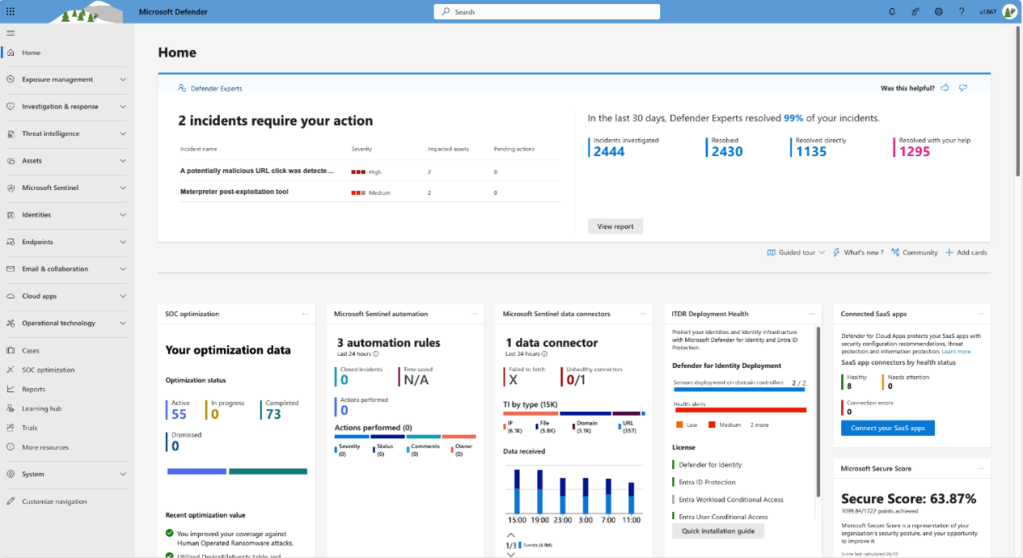
My team has been testing the Sentinel experience within the Defender portal in our lab environments for some time now. Overall, it’s been a pleasant and promising experience, especially from an analyst workflow perspective. But as a Cybersecurity Architect at a MDR provider managing multiple tenants across Lighthouse, and as someone closely watching Sentinel’s evolution, there are key considerations I’m keeping an eye on — especially around multi-tenancy and access control.
This post outlines what’s changing, what I have observed so far, and what MSSPs should be doing now to prepare.
First Impressions: Streamlined Analyst Experience
The Defender portal (security.microsoft.com) offers a cleaner, faster, and more investigation-friendly interface. Key benefits I’ve observed in the lab:
- Unified incident queues across Sentinel and Defender XDR make correlation and triage smoother.
- Entity timelines and investigation views are more responsive and visually intuitive.
- Workbooks, logs, and hunting are all accessible in one place, reducing analyst context switching.
This is a welcome shift from the nested Azure blade structure, which does not appear to have been originally designed for day-to-day security operations. From a SOC analyst perspective, the move is a step forward.
Multi-Tenancy Remains a Concern
One of the biggest concerns for MSSPs is still multi-tenancy. While Microsoft Sentinel supports Azure Lighthouse, the Defender portal’s multi-tenant support remains limited. Today:
- We can’t pivot easily between tenants inside the Defender portal like we can with Azure Lighthouse.
- Role management and visibility across tenants is inconsistent or siloed.
- Automating cross-tenant workflows (like triage or hunting) requires workarounds. That said, it’s important to note that Microsoft has hinted at future API and automation in the Defender portal.
Microsoft has acknowledged this gap and hinted that multi-tenant experiences in Defender are on the roadmap. But until that matures, Azure will remain critical for Lighthouse-based client management — even as the Defender portal becomes the operational front-end for analysts.
RBAC: Fragmented for Now, Even With Granular RBAC in Preview
Another point MSSPs should track is the current state of permissions in the Defender portal.
- Sentinel continues to use Azure RBAC, with fine-grained controls scoped by resource groups or workspaces.
- The Defender portal, by contrast, uses Defender-specific roles (e.g., Security Reader, Incident Responder), which do not map cleanly to Azure RBAC.
- This creates some confusion when onboarding users: a user may have full Sentinel access in Azure, but find they’re blocked or missing functionality in the Defender view.
To add complexity, Microsoft recently moved a new feature, Granular RBAC for Sentinel, into Preview. This includes controls over rule creation, automation, and workspace-specific scoping. It’s a great step forward — but its relationship with Defender roles remains unclear.
As of now, there’s no unified RBAC model that spans Azure + Defender + Lighthouse. That’s a challenge for MSSPs who need to manage hundreds of clients efficiently.
The hope is that Microsoft addresses this with a standardized access control framework (or at least clearer role mapping guidance) before the Defender portal becomes the default.
What MSSPs Should Be Doing Now
If you’re running an MDR service or managing Sentinel deployments across clients, here are a few actions worth taking:
- Enable Sentinel in the Defender Portal for Internal Testing
Validate SOC workflows (triage, hunting, workbooks, investigation). Compare with existing Azure portal experiences for efficiency and gaps. - Evaluate Role Assignments and Document Gaps
Confirm that users with Sentinel access in Azure can still function in Defender. Identify where Defender RBAC roles need to be assigned or adjusted. - Track Multi-Tenant Limitations
Log and report any workflow disruptions due to lack of Lighthouse support. Engage your Microsoft reps or partner channels — community feedback matters here. - Update Internal Runbooks and SOPs
The UI, navigation paths, and even terminology are changing. Prepare your teams for a hybrid state during the transition. - Monitor Granular RBAC Developments
If you’re participating in the Preview, test the new controls extensively. Watch for integration with the Defender role model — or potential divergence.
For more recommendations and guidance on moving Sentinel to Defender, please check out Microsoft’s official documentation and migration guidance: https://learn.microsoft.com/en-us/azure/sentinel/move-to-defender
Looking Ahead
From my testing, it’s clear the Defender portal is the future of Microsoft’s SecOps experience. It brings together Sentinel, Defender for Endpoint, Defender for Identity, and more — and when it works, it works well.
But as an MSSP, we’re still straddling two worlds:
- Sentinel in Azure for deployment, automation, and client-level management
- Sentinel in Defender for real-time triage, hunting, and investigation
Until Microsoft addresses the multi-tenant visibility and RBAC fragmentation, we’ll continue to rely on both.
Conclusion
The move to the Defender portal is a net positive — especially for SOC teams that live in incidents, alerts, and investigations. But from a managed services perspective, we still need clearer answers around:
- Cross-tenant management support
- Unified access control
- Transition timelines and feature parity
Like most things in the Microsoft Security ecosystem, this change is happening in phases. My advice? Stay close to the preview, provide feedback, and prepare your teams early. If you’re an MSSP or MDR provider also navigating this transition, I’d love to compare notes or hear how you’re approaching these same challenges. I’ll be at Black Hat ’25 in Las Vegas and would love to chat!
Additional Resources
https://learn.microsoft.com/en-us/unified-secops-platform/microsoft-sentinel-onboard
 Stueck on Security